Agent Builder
Use Agent Builder to create team-owned agents without writing application code. The guided UI brings together instructions, configured models, tools, organizational knowledge, reusable skills, and runtime guardrails.
Quick links: Dynamic Agents Helm chart · Developer guide
What you can do
- Create an agent for a focused job, such as answering team questions or investigating an operational issue.
- Give it a clear identity, instructions, model, approved tools, knowledge, and reusable skills.
- Test changes immediately in Chat before sharing the agent with a team.
- Limit who can discover, use, or manage the agent with team or global sharing.
Agent Builder is the no-code path for managed agents. Choose the developer guide when you need to package an agent as application code or control its deployment yourself.
:::note Planned connector
A2A is not currently a CAIPE platform transport. The planned reintroduction is as an optional connector tool configured from Agent Builder; until it is available, use MCP servers for external tools and services.
:::
Watch the demo
Watch the full Agent Builder demo on Vidcast ↗
How it works
Agent Builder saves the agent definition. The Dynamic Agents runtime loads that definition when an authenticated caller starts a chat. At runtime, CAIPE checks the caller's access to both the agent and the resources it uses.
Build an agent
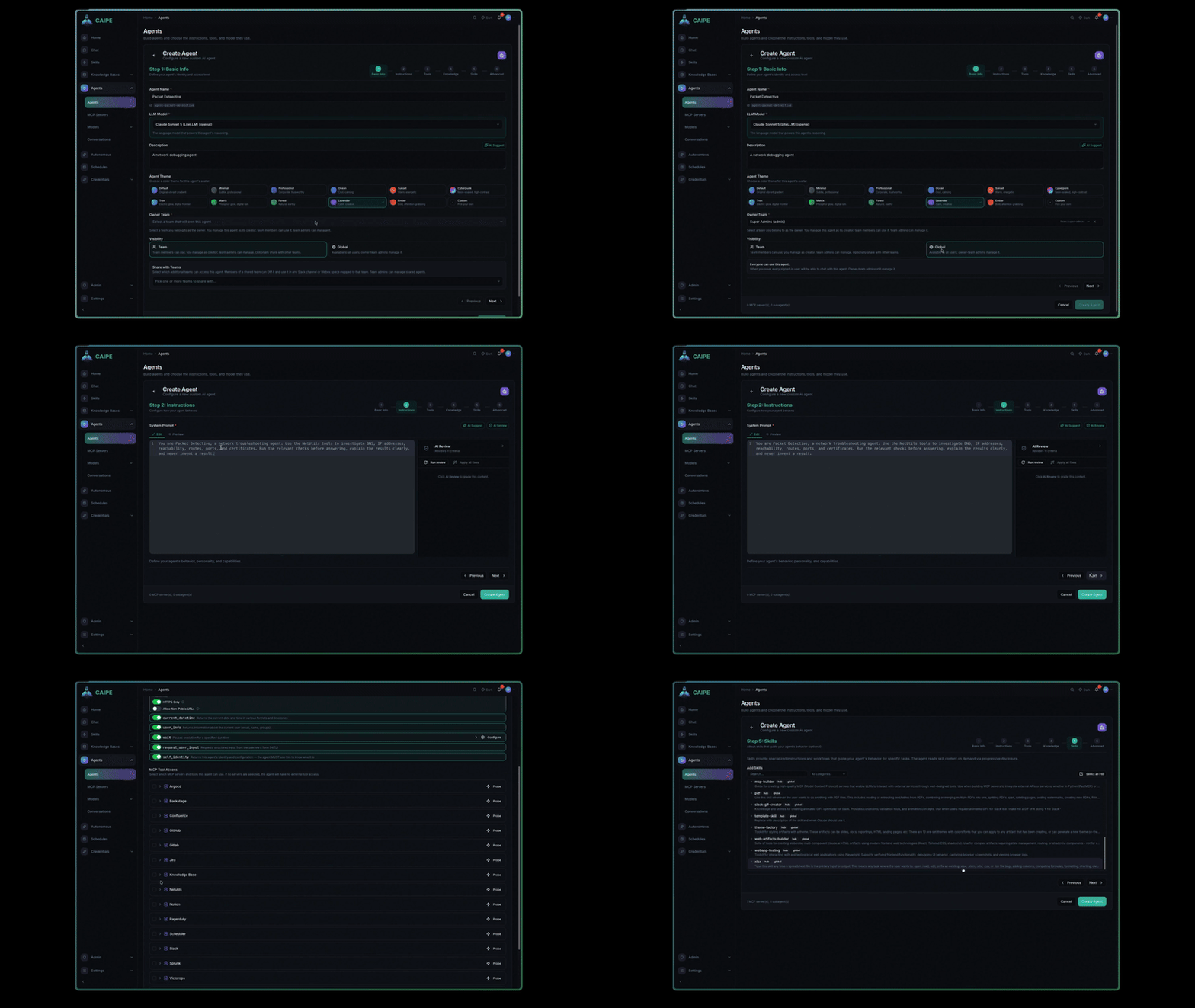
To create an agent, open Agents → Create Agent, complete the steps below, and select Create Agent. You can return to earlier steps before saving.
Agent Builder guides you through six steps:
| Step | Configure |
|---|---|
| Basic Info | Name, description, owner team, and team or global visibility |
| Instructions | System prompt, model, and model parameters |
| Tools | Registered MCP tools and CAIPE built-in tools |
| Knowledge | Individual data sources and reusable collections |
| Skills | Reusable instructions and packaged capabilities |
| Advanced | Subagents, human approval rules, middleware, and workflow access |
After you save an agent, you can test it in chat without redeploying the runtime. You can also clone it, enable or disable it, and export it as YAML.
A practical first agent
- Give the agent a specific name and describe the job it should perform.
- Write instructions that define its role, boundaries, and expected response.
- Select a model and add only the tools it needs.
- Attach a data source or collection when answers should use organizational information.
- Add a skill when the agent should follow a repeatable procedure.
- Save it, test a representative request in Chat, then share it with the intended team.
Start with the smallest useful capability set. You can add tools, knowledge, and skills later without rebuilding the agent.
Knowledge and tool scope
- MCP servers can connect over
stdio, SSE, or Streamable HTTP. - Built-in tools include URL fetch, current date and time, user information, wait, human input requests, and workflow execution.
- Selecting data sources or collections narrows the knowledge available to the agent.
- The effective knowledge scope is the intersection of the agent's selection and the invoking caller's search access. Configuring knowledge never grants the caller additional access.
- Sensitive tools can require human approval before execution.
Ownership and sharing
Every agent has an owner team.
- Team visibility grants use according to the selected team relationships.
- Global visibility makes the agent discoverable across the organization while retaining team ownership for management.
- OpenFGA relationships control who can discover, use, manage, share, or delete an agent.
- Resource authorization is checked when the agent runs; hiding an action in the UI is not a security boundary.
GitOps bootstrap
Use appConfig in the caipe-ui chart to preconfigure resources at installation time.
| Key | Purpose |
|---|---|
appConfig.models | Model endpoints available for agent selection |
appConfig.mcp_servers | MCP server registrations |
appConfig.agents | Agent definitions, capabilities, and visibility |
appConfig.workflow_configs | Workflow definitions that agents can run when granted access |
Bootstrapped resources are marked config_driven and initially remain read-only
in the UI. An admin can adopt supported config-driven agents into database-backed
management when interactive editing is required.
Applying the configuration is idempotent: upgrades do not duplicate entries, and removed config-driven entries are cleaned up on a later startup.
Runtime and operations
- REST and SSE APIs support browser, bot, workflow, and service callers.
- MongoDB stores UI-managed definitions, agent state, and conversation history.
- The Dynamic Agents Helm chart supports replicas, resource settings, and horizontal autoscaling.
AGENT_RUNTIME_TTL_SECONDSexpires idle agent runtimes.- Kubernetes Secrets or External Secrets Operator can supply model and integration credentials.
- Prometheus metrics are exposed at
/metrics.