Agent Builder
Use Agent Builder to create team-owned agents without writing application code. The guided UI brings together instructions, configured models, tools, organizational knowledge, reusable skills, and runtime guardrails.
Quick links: Dynamic Agents Helm chart · Developer guide
What you can do
- Create an agent for a focused job, such as answering team questions or investigating an operational issue.
- Give it a clear identity, instructions, model, approved tools, knowledge, and reusable skills.
- Test changes immediately in Chat before sharing the agent with a team.
- Limit who can discover, use, or manage the agent with team or global sharing.
Agent Builder is the no-code path for managed agents. Choose the developer guide when you need to package an agent as application code or control its deployment yourself.
:::note Remote A2A tools
Platform admins register remote A2A endpoints in the Remote A2A Agents section of the Advanced step. Agent authors then select the registered endpoints each agent may call and configure a timeout for each selection. Dynamic Agents resolves authentication for every call using the configured header:
- User JWT: the active caller's token (the default).
- Saved secret: a secret selected from Credentials; each caller needs permission to use it.
- Connected credential: each caller's connected account for the selected provider.
Authorization uses the Bearer scheme; other headers receive the credential value
directly. Only references are saved in the registry. Discover Agent Card and
Test connection use the same authentication as tool calls. The official A2A
SDK negotiates JSON-RPC or HTTP+JSON from the Agent Card.
:::
Unified agent catalog
Open Agents for CAIPE-created assistants and connected A2A specialists.
Configured ACP agents appear once, as their existing CAIPE configuration.
Use Grid for compact cards with a soft gradient header or List for
management rows. The browser remembers the view separately for each signed-in
account. Source and runtime/connection filters apply before shared pagination.
Existing ?tab=remote-agents links open the unified catalog.
Choose Add agent to:
- Create CAIPE agent: open Agent Builder to configure a new assistant.
- Connect existing agent: discover public A2A Agent Cards from up to eight agent or Agent Card URLs, or find agents in configured Kubernetes namespaces. Public discovery sends no caller credentials. Review a candidate before connecting.
- Use Enter connection details manually for a known endpoint, including agents that need authentication. Discover Agent Card reads metadata with the selected credential source and fills the name and description without registering the agent.
Connection review keeps the name, URL, description, credential source, and header name visible. Advanced settings contains the timeout (1–600 seconds), optional framework display label, and streaming preference. Connect agent saves the registration; discovery alone does not register it. Connecting requires registry management access.
The avatar retains the agent's saved gradient, with a stable per-agent fallback. Its small badge identifies the known harness first: Claude Agent SDK / Claude Code use Claude, Deep Agents uses Deep Agents, and AgentCore uses AgentCore. The model provider does not select this badge. An unknown remote harness uses the A2A icon; A2A/ACP connection labels remain separate. App-owned assistants retain their app identity. Chat headers, chat lists, cards and the subagent picker reuse the same badge resolver.
For registered A2A services, admins can set optional Framework display metadata (Claude Code, Claude Agent SDK, Google ADK, Deep Agents, or AgentCore). That label never changes execution, credentials, or tool permissions. Connection discovery, registration, and editing reuse the registry dialogs.
- A2A: registry managers can run Test connection with the saved authentication. The result shows latency, advertised capabilities, skills, and the full Agent Card. This reads metadata; it does not execute an agent task. Results are local to the current page and reset on refresh.
- CAIPE-created, including ACP: Chat opens a new conversation using the existing agent and operator profile. Agents with known readiness problems stay disabled and explain what needs attention. Configuration readiness does not guarantee provider availability.
- Select registered specialists in Agent Builder → Advanced → Subagents to delegate work. Catalog browsing and testing do not change agent permissions or registrations.
Watch the demo
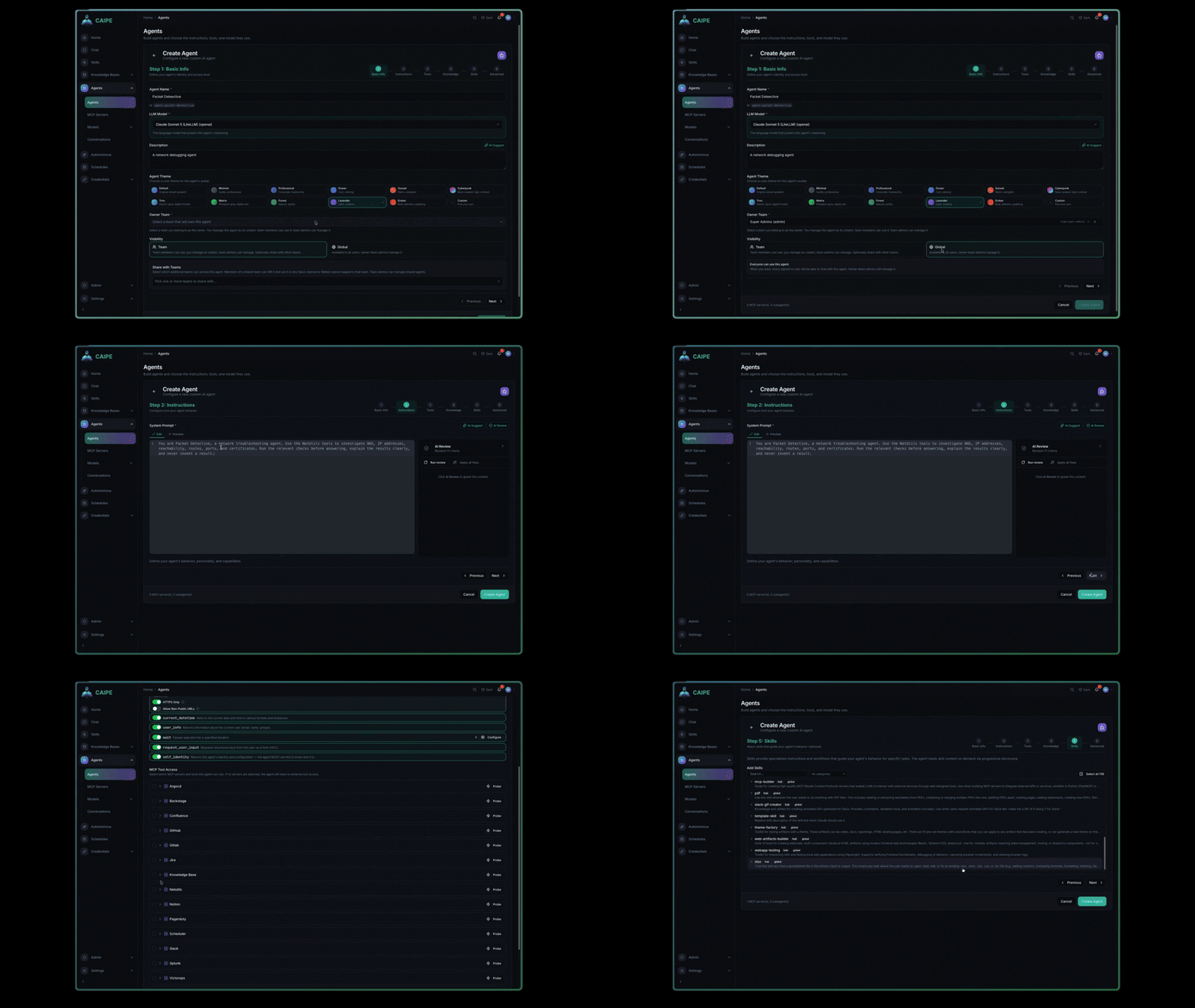
Watch the full Agent Builder demo on Vidcast ↗
How it works
Agent Builder saves the agent definition. The Dynamic Agents runtime loads that definition when an authenticated caller starts a chat. At runtime, CAIPE checks the caller's access to both the agent and the resources it uses.
Build an agent
To create an agent, open Agents → Create Agent, complete the steps below, and select Create Agent. You can return to earlier steps before saving.
Agent Builder guides you through six steps:
| Step | Configure |
|---|---|
| Basic Info | Name, description, owner team, and team or global visibility |
| Instructions | System prompt, model, and model parameters |
| Tools | Registered MCP tools and CAIPE built-in tools |
| Knowledge | Individual data sources and reusable collections |
| Skills | Reusable instructions and packaged capabilities |
| Advanced | Subagents (CAIPE, configured ACP, and registered A2A agents), human approval rules, middleware, and workflow access |
After you save an agent, you can test it in chat without redeploying the runtime. You can also clone it, enable or disable it, and export it as YAML.
A practical first agent
- Give the agent a specific name and describe the job it should perform.
- Write instructions that define its role, boundaries, and expected response.
- Select a model and add only the tools it needs.
- Attach a data source or collection when answers should use organizational information.
- Add a skill when the agent should follow a repeatable procedure.
- Save it, test a representative request in Chat, then share it with the intended team.
Start with the smallest useful capability set. You can add tools, knowledge, and skills later without rebuilding the agent.
Remote agents and subagents
- Agents lists discoverable CAIPE agents and registered A2A entries in one catalog. Disabled CAIPE agents remain manageable, with Chat disabled. A registry outage shows an explicit warning while authorized CAIPE results stay usable.
- ACP entries refer to existing CAIPE agents. Chat starts their normal conversation; Open agent opens their saved configuration with the usual permission checks. Operator profiles, native sessions, and credentials stay in their existing configuration. They are not copied into the A2A registry.
- A2A Agent Card discovery and registration remain specific to A2A endpoints. Arbitrary ACP endpoints and full ACP conformance are not implied by this view.
- Advanced → Subagents provides one picker for local Deep Agents, configured Harness children (including ACP), and registered A2A agents. Removing a selection removes the parent's reference, not the remote agent or its credentials.
- Claude SDK and ACP entries with a selected MCP server that is disabled or missing show Needs attention. Chat and new subagent selections are disabled; saved references remain visible. The owner can open the agent and repair its tool configuration without granting new access.
- Before a new Claude run, Gateway checks the conversation's pinned tool set against current server availability and agent grants. A rejected admission reports Agent configuration needs attention, links to agent settings, and offers no blind retry. The error classification survives a chat reload. Retry is hidden on both the rejected response and its user-message bubbles; other turns retain their normal actions. Existing request replay and recovery controls remain available. This checks configuration metadata and initializes permitted MCP catalogs through the existing caller/agent gateway path. It never invokes tools. Credential and permission denials retain the existing unavailable-tool behavior. Execution-time authorization checks remain authoritative. Session-based MCP catalog reads send the initialized notification before listing tools and follow pagination within the shared readiness deadline. Repeated cursors or catalogs exceeding 100 pages fail instead of producing a partial catalog. Empty successful notification responses are accepted even when labeled JSON. Failures log only agent/server IDs and a bounded diagnostic category, excluding credentials and private upstream details.
- Each picker catalog becomes usable independently. Requests and response-body reads time out after ten seconds; refresh cancels pending reads and retries without dropping saved references. Only CAIPE choices exclude the parent ID; an A2A entry with the same ID remains a distinct agent.
- Harness children require the Engine delegation capability. Older backends keep those choices disabled. ACP chat uses the configured worker directly; A2A delegation currently runs through a Deep Agents supervisor.
Knowledge and tool scope
- MCP servers can connect over
stdio, SSE, or Streamable HTTP. - Remote A2A agents are admin-managed registry entries. The registry stores the endpoint and Agent Card metadata; agent documents store registry IDs rather than arbitrary endpoint URLs.
- Configure
REMOTE_AGENT_URLSas a comma-separated deployment seed when needed. Seeded entries still need to be selected in the agent's Advanced step. - A2A tools use the official Python SDK for JSON-RPC and HTTP+JSON protocol negotiation, send the configured authentication header (caller JWT, saved secret, or connected credential), and enforce the configured per-agent timeout.
- Built-in tools include URL fetch, current date and time, user information, wait, human input requests, and workflow execution.
- Selecting data sources or collections narrows the knowledge available to the agent.
- The effective knowledge scope is the intersection of the agent's selection and the invoking caller's search access. Configuring knowledge never grants the caller additional access.
- Sensitive tools can require human approval before execution.
Ownership and sharing
Team-visible agents require an owner team. Global agents can have an owner team.
-
Choose an owner team on Basic Info before pressing Next or selecting a later setup step for a new team-visible agent. If it is missing, the builder stays on Basic Info, focuses the owner picker, and explains what to select. Deep links to later steps follow the same requirement.
-
Team visibility grants use according to the selected team relationships.
-
Global visibility makes the agent discoverable across the organization while retaining team ownership for management.
-
OpenFGA relationships control who can discover, use, manage, share, or delete an agent.
-
Resource authorization is checked when the agent runs; hiding an action in the UI is not a security boundary.
GitOps bootstrap
Use appConfig in the caipe-ui chart to preconfigure resources at installation time.
| Key | Purpose |
|---|---|
appConfig.models | Model endpoints available for agent selection |
appConfig.mcp_servers | MCP server registrations |
appConfig.agents | Agent definitions, capabilities, and visibility |
appConfig.workflow_configs | Workflow definitions that agents can run when granted access |
Bootstrapped resources are marked config_driven and initially remain read-only
in the UI. An admin can adopt supported config-driven agents into database-backed
management when interactive editing is required.
Applying the configuration is idempotent: upgrades do not duplicate entries, and removed config-driven entries are cleaned up on a later startup.
Runtime and operations
- REST and SSE APIs support browser, bot, workflow, and service callers.
- MongoDB stores UI-managed definitions, agent state, and conversation history.
- The Dynamic Agents Helm chart supports replicas, resource settings, and horizontal autoscaling.
AGENT_RUNTIME_TTL_SECONDSexpires idle agent runtimes.- Kubernetes Secrets or External Secrets Operator can supply model and integration credentials.
- Prometheus metrics are exposed at
/metrics.