Knowledge Bases
Use Knowledge Bases to turn organizational information into governed context for people and agents. They combine hybrid retrieval, optional graph reasoning, reusable collections, and resource-level access control.
Quick links: Architecture · Ingestors · MCP tools · Authentication
What you can do
- Bring files, web pages, and connected collaboration sources into one search experience.
- Search across the content you are allowed to read, using meaning and exact terms together.
- Group related sources into collections so agents can reuse a stable scope.
- Attach a source or collection to an agent in Agent Builder.
- Explore relationships between entities when Graph RAG is enabled.
A practical workflow
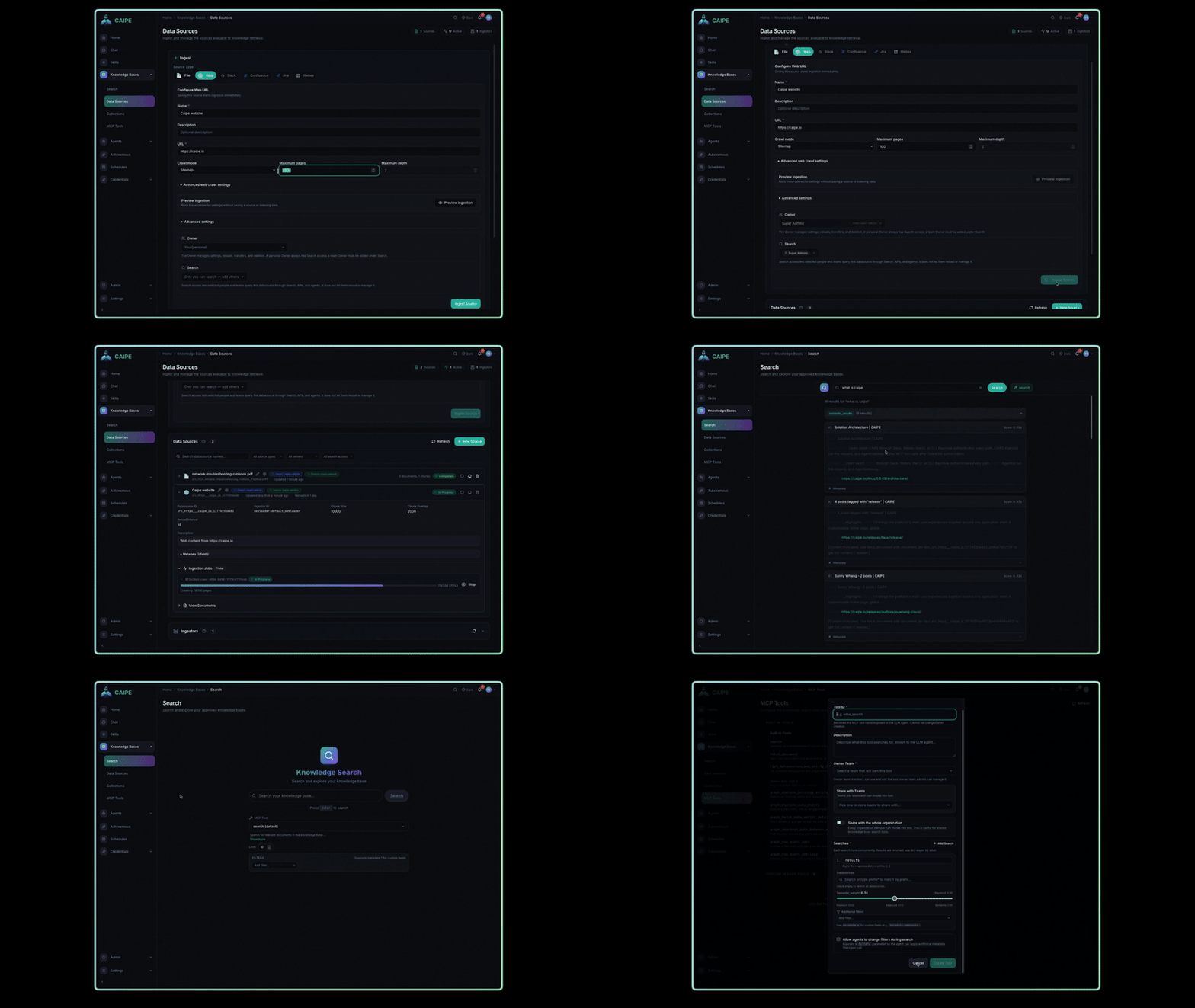
- Open Knowledge Bases → Data Sources and add a source, or ask an operator to enable a deployment-managed ingestor.
- Wait for ingestion to finish, then use Search to confirm the content and metadata look right.
- Create a Collection when several sources belong together or should be reused by multiple agents.
- Share the source or collection with the people and teams who should search it. Search access is separate from who manages ingestion.
- In Agent Builder, select the source or collection in the Knowledge step and test the agent with a real question.
If a result is missing, check ingestion status and your search access first. Selecting knowledge for an agent does not grant a person access to that data.
Watch the demo
Watch the full Knowledge Bases demo on Vidcast ↗
How it works
Knowledge Bases in the UI
The CAIPE UI includes these Knowledge Bases areas:
| Area | Purpose |
|---|---|
| Search | Run hybrid searches across data sources the caller can access |
| Data Sources | Create sources and manage ingestion, ownership, and search access |
| Collections | Group stable data source IDs into reusable scopes without copying content |
| Graph | Explore authorized entity relationships when Graph RAG is enabled |
| MCP Tools | Review tools available to agents created in Agent Builder and other MCP clients |
Data sources
CAIPE supports both self-service sources and deployment-managed ingestors.
Self-service sources
Users can create these sources from the CAIPE UI when the corresponding ingestor is enabled:
- File
- Web
- Slack
- Confluence
- Jira
- Webex
Configuration-seeded sources
Operators can declare the same web and collaboration sources in the application configuration:
- Compose:
rag_sourcesinconfig/app-config.yaml - Helm:
caipe-ui.appConfig.rag_sources
CAIPE seeds these records into the UI datasource store and starts ingestion
when the matching ingestor is available. They remain visible but read-only in
the UI; update or remove them through application configuration. Declare
search_with_teams to grant query access independently from source management.
Deployment-managed ingestors
Platform operators can configure additional ingestors for sources such as:
- AWS
- Kubernetes
- Backstage
- Argo CD
- GitHub
See Ingestors for availability, configuration, and the type of content each ingestor produces.
Hybrid search
Document retrieval combines two complementary signals:
- Semantic search uses dense vector embeddings to match meaning and context.
- Keyword search uses BM25 sparse vectors for exact terms and phrases.
- Weighted reranking combines both result sets with configurable weights.
Milvus stores the dense and sparse indexes. Search requests apply data source constraints before returning ranked results.
Knowledge graph and ontology
When Graph RAG is enabled, Neo4j stores structured entities and relationships.
- Nested structures can be split into connected sub-entities.
- Authorized users can explore entity neighborhoods and paths.
- The Ontology Agent discovers potential relationships between entity types, validates them, and synchronizes accepted relationships to the data graph.
- The deployment-wide ontology requires unrestricted data source access. Ordinary data-graph exploration is filtered to the caller's accessible sources.
Ownership, search access, and collections
CAIPE keeps ownership, sharing, and runtime access separate. There are four independent subjects:
| Subject | What they control | What sharing grants |
|---|---|---|
| Data source owner | Connector configuration, ingestion, and direct Search sharing | Read access to that data source |
| Collection owner | Collection metadata, member data sources, maintainers, and readers | Permission to use the collection as a search-time filter — no read access to its member data sources |
| Agent owner | Agent configuration, including selected data sources and collections | Permission to use the agent |
| Agent user | The request being run | Nothing automatically; this caller's existing permissions are evaluated at runtime |
Ownership controls configuration. When another person runs an agent, CAIPE does not borrow the data access of the data source, collection, or agent owner.
A collection is a control-plane grouping. It references data source IDs without
copying chunks or changing vector storage. A caller with can_read on a
collection may use it as a search-time filter (the collection_id parameter),
but that grants no read access to its member data sources — each member
remains independently governed, so a collection can only narrow a caller's
results, never widen them. Publishing a data source into a collection
therefore requires only that the publisher can already read that data source,
not that they manage it: since membership grants no one new access, doing so
can never let a search-only relationship escalate into access for someone
else.
Agent knowledge scope
Agent Builder can attach individual data sources and collections to an agent.
Runtime access is evaluated in this order:
- The caller must have
can_useon the agent. - The caller must have the organization-level
can_searchcapability. - CAIPE resolves data sources the caller can read directly (data source or knowledge-base grants). Being able to read a collection does not add to this set.
- CAIPE resolves the agent's configured scope from its directly selected data sources and the current members of its selected collections.
- Search receives only the intersection of the caller-readable set, the agent scope, and any narrower request filter.
The caller's readable set is therefore just:
direct data source or knowledge-base access
The effective agent result is:
caller-readable data sources
INTERSECT agent-selected data sources and collection members
INTERSECT optional request filter
The agent's knowledge configuration is a scope, not a grant. For example, if a
caller can read data source D1 directly and an agent includes D1 through a
collection, D1 remains available even if the caller cannot manage or discover
that collection. Conversely, selecting a collection on an agent never gives the
caller the collection owner's permissions.
For interactive calls, the invoking user's bearer identity is evaluated. For scheduled or autonomous calls, CAIPE evaluates the task owner's delegated identity. Explicit service-account calls use that service account's grants. A missing delegated identity fails closed instead of falling back to the agent owner or the Dynamic Agents service account.
MCP access
The RAG server exposes MCP tools for:
- Hybrid search
- Full-document fetch
- Data source and entity-type discovery
- Graph neighborhood exploration
- Path finding and raw graph queries when the caller has the required access
See MCP Tools for the current tool names and usage pattern.
Getting started
Use the repository-level Quick Start to configure and start CAIPE. The canonical Docker Compose files live at the repository root.
After startup, the default local access points are:
| Interface | URL | Availability |
|---|---|---|
| CAIPE Knowledge Bases UI | http://localhost:3000/knowledge-bases | CAIPE UI profile |
| RAG API documentation | http://localhost:9446/docs | RAG profile |
| MCP endpoint | http://localhost:9446/mcp | RAG profile |
| Neo4j Browser | http://localhost:7474 | Graph RAG profile only |
For deployment settings, see the RAG server README.